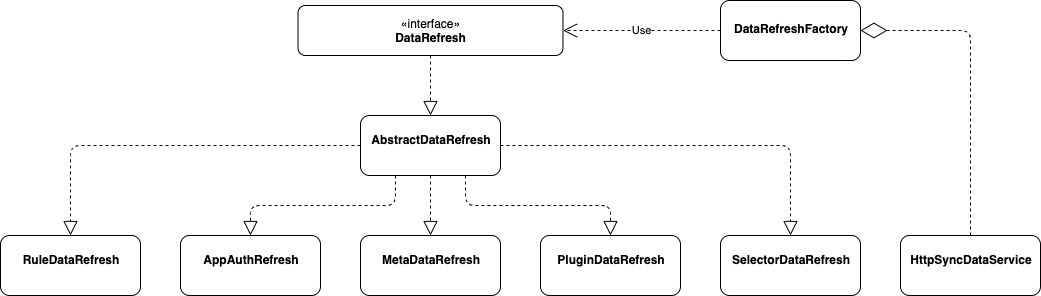
publicHttpSyncDataService(final HttpConfig httpConfig, final PluginDataSubscriber pluginDataSubscriber, final List<MetaDataSubscriber> metaDataSubscribers, final List<AuthDataSubscriber> authDataSubscribers){ this.factory = new DataRefreshFactory(pluginDataSubscriber, metaDataSubscribers, authDataSubscribers); this.httpConfig = httpConfig; this.serverList = Lists.newArrayList(Splitter.on(",").split(httpConfig.getUrl())); this.httpClient = createRestTemplate(); this.start(); }
privatevoidstart(){ // It could be initialized multiple times, so you need to control that. if (RUNNING.compareAndSet(false, true)) { // fetch all group configs. this.fetchGroupConfig(ConfigGroupEnum.values()); int threadSize = serverList.size(); this.executor = new ThreadPoolExecutor(threadSize, threadSize, 60L, TimeUnit.SECONDS, new LinkedBlockingQueue<>(), SoulThreadFactory.create("http-long-polling", true)); // start long polling, each server creates a thread to listen for changes. this.serverList.forEach(server -> this.executor.execute(new HttpLongPollingTask(server))); } else { log.info("soul http long polling was started, executor=[{}]", executor); } }
privatevoidfetchGroupConfig(final ConfigGroupEnum... groups)throws SoulException { for (int index = 0; index < this.serverList.size(); index++) { String server = serverList.get(index); try { this.doFetchGroupConfig(server, groups); break; } catch (SoulException e) { // no available server, throw exception. if (index >= serverList.size() - 1) { throw e; } log.warn("fetch config fail, try another one: {}", serverList.get(index + 1)); } } }
privatevoiddoFetchGroupConfig(final String server, final ConfigGroupEnum... groups){ StringBuilder params = new StringBuilder(); for (ConfigGroupEnum groupKey : groups) { params.append("groupKeys").append("=").append(groupKey.name()).append("&"); } String url = server + "/configs/fetch?" + StringUtils.removeEnd(params.toString(), "&"); log.info("request configs: [{}]", url); String json = null; try { json = this.httpClient.getForObject(url, String.class); } catch (RestClientException e) { String message = String.format("fetch config fail from server[%s], %s", url, e.getMessage()); log.warn(message); thrownew SoulException(message, e); } // update local cache boolean updated = this.updateCacheWithJson(json); if (updated) { log.info("get latest configs: [{}]", json); return; } // not updated. it is likely that the current config server has not been updated yet. wait a moment. log.info("The config of the server[{}] has not been updated or is out of date. Wait for 30s to listen for changes again.", server); ThreadUtils.sleep(TimeUnit.SECONDS, 30); }